
My Shark air purifier was showing 0% clean air and a 999 particle reading. Before replacing the unit, I checked the filter and cleaned the small dust-sensor openings on the back. That was the fix I shared in my original video.
Years later, the problem returned, so I filmed a follow-up. This time, cleaning the sensor got the display responding again—but smoky outdoor conditions meant the air-quality reading still stayed below 100%. That second part matters just as much as the cleaning step.
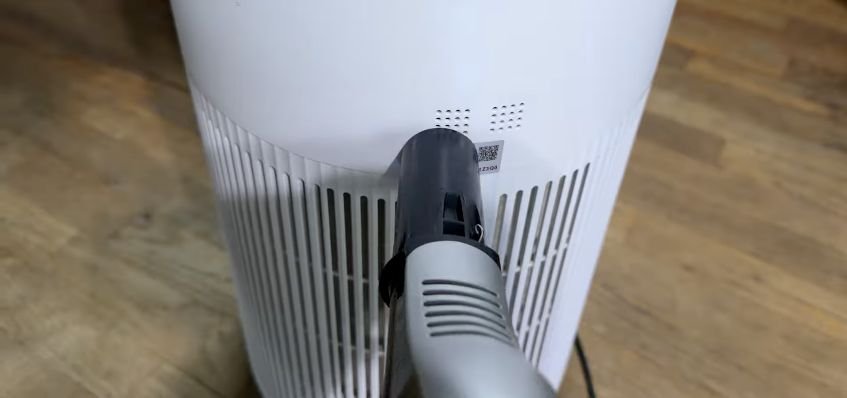
The first thing I would try: Turn the purifier off, unplug it, and gently vacuum dust from the exterior sensor openings. Then restart it and watch how the readings respond. This is the method I used on the unit shown in my videos; check your model’s manual for the sensor location and cleaning instructions.
Affiliate disclosure: As an Amazon Associate, I earn from qualifying purchases. Using my replacement-filter link supports SLVRBCK Troop at no additional cost to you.
Jump to: Original video · Cleaning steps · Follow-up video · Still reading low? · Replacement filter
Watch my original Shark air purifier fix
Watch the original tutorial on YouTube
What you need
A vacuum with a hose or small nozzle attachment, access to the back of your purifier, and your model’s owner’s guide. My follow-up shows the sensor cleaning without opening the unit or removing the filter.
How I clean the dust-sensor openings
- Turn it off and unplug it.
Switch the purifier off and disconnect it from the outlet before cleaning or moving it. - Find the sensor openings on the back.
On my unit, these are the small groups of holes above the larger rear grille. Use the video and your model’s manual to identify the correct area. - Gently vacuum the exterior openings.
Use the nozzle to lift dust from around the small holes. This is an exterior clean: do not push the nozzle or other objects into the openings, or add liquid. - Check the filter only if needed.
In my original video, I removed the bottom cover and inspected the filter first. In the follow-up, I cleaned the sensor without removing anything. If you inspect your filter, follow the removal instructions for your model and put the filter and cover back correctly. - Restart and watch the display.
Put the purifier back in its normal position, plug it in, and turn it on. In my follow-up, I used Auto mode and saw the clean-air reading move to about 69–70%. Give it time to update instead of expecting an instant 100%.
What changed in my follow-up video
The purifier was showing 0% clean air again. I powered it down and vacuumed the rear sensor openings. I did not open the unit or take out the filter. After restarting it in Auto mode, I saw the reading climb to around 69–70%.
I also tried blowing air into the sensor openings in that video. For the written steps above, I start with gentle vacuuming of the exterior. Check your model’s care instructions before trying a different cleaning method.
At first, the lower reading still made me wonder whether something was wrong. It was smoky outside, though, and I concluded that the purifier was reporting the conditions after the cleaning. The goal was to get the sensor responding—not force the display to show 100%.
Watch the follow-up on YouTube
What if it still reads 0% or stays below 100%?
A changing reading can still be a low reading. My follow-up is a good example: the display responded after cleaning, but the smoky conditions meant it did not immediately show clean air. Consider what is happening around the purifier as well as what is on its display.
If the reading remains stuck: Check the sensor area, filter installation, and troubleshooting instructions in your model’s manual. If the problem persists, contact Shark support before assuming the whole purifier needs replacing. This exterior cleaning step is not a diagnosis of every possible fault.
Do you need to replace the filter?
In the original video, my filter-life display showed 47% remaining. I inspected the filter and chose to keep using it at that point. That was my decision for that filter; a percentage on the display alone does not tell you everything about its condition.
Sensor cleaning and filter replacement are separate jobs. Cleaning the small rear openings does not restore a worn-out filter. Follow your model’s filter-care and replacement guidance.
Check replacement-filter options on Amazon
The linked listing has different filter options. Match your exact purifier model and filter part number to the selected option before ordering. It is not one filter that fits every Shark purifier.
My takeaway
Before replacing my Shark air purifier, I would check those small sensor openings. A quick exterior clean got mine responding again. My follow-up also showed why a low clean-air score afterward does not automatically mean the cleaning failed.
More DIY & How-To guides · Subscribe to SLVRBCK Troop on YouTube